Building a Local-SEO Site for an Age-Restricted Shop, in Code This Time
I tried an AI website builder on one client site and ended up rebuilding it in code. So this one I built in Astro with Claude from the first commit. Here's what it takes to build a clean local-SEO site for an age-restricted retailer.
Earlier this year I tried an AI website builder on a client site, Griffin Renovation. It got something live fast, but I ended up rebuilding it in code to get real SEO control and to drop the vendor lock-in and the monthly fee. That was a one-time experiment, and it convinced me the builder is not where I want to start. Writing the site in code is.
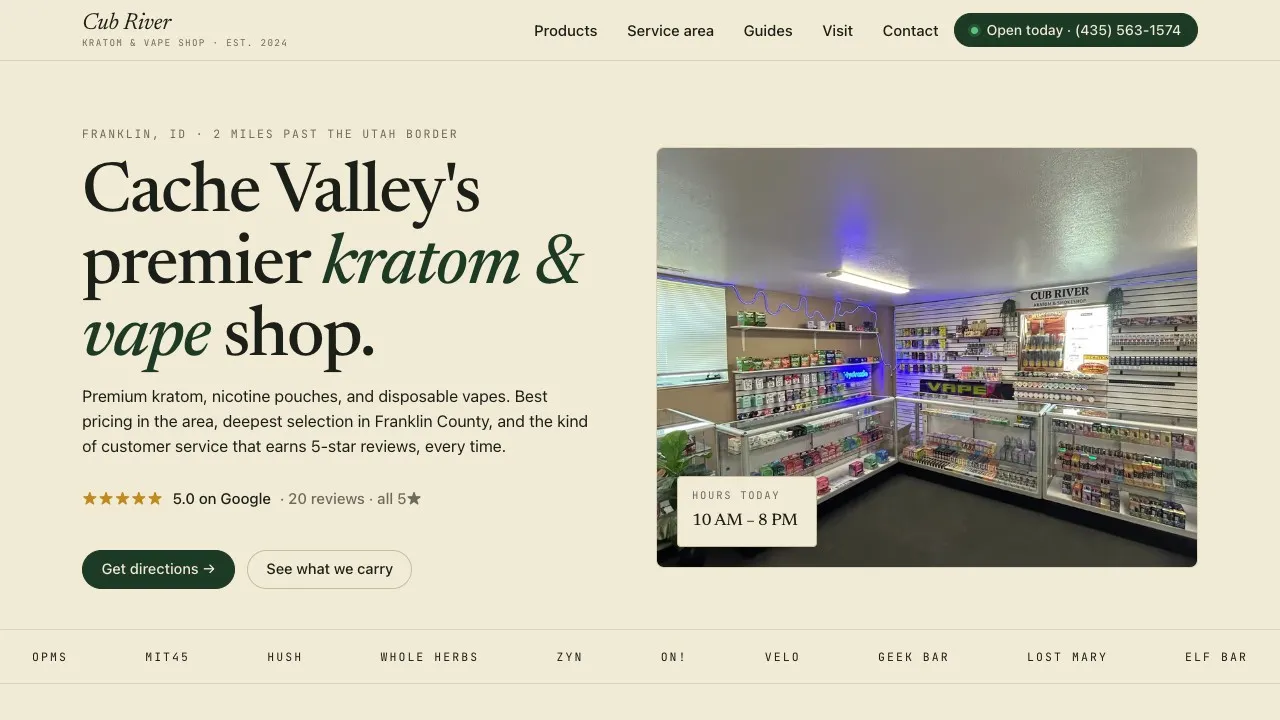
So that is how this one got built. Cub River Kratom & Vape Shop is a specialty retailer in Franklin, Idaho, two miles north of the Utah border, serving the Cache Valley area. The whole thing is Astro, written in code from the first commit, and I built it the way I build most things now: paired with Claude in Claude Code. Here is why code was the obvious call over a builder, and what it actually takes to put up a clean local-SEO site for an age-restricted retailer.
What it needed to do
A local retail website does not need a clever layout or a portfolio gallery. It needs to tell Google and a person on a phone four things: where the shop is, when it is open, what it carries, and how to get there. Because Cub River sells age-restricted products, it also needed to handle that responsibly from the first screen. That is the whole brief.
How I worked with Claude on this one
This was a Claude Code build, not a chat-and-copy-paste build. I ran it as a pairing session: I brought the inputs and the judgment, Claude did most of the typing.
The split was clean. The things only I could know or decide were mine: the shop’s exact name, address, phone, and hours; which nearby towns were worth a landing page; which products to feature; and the call to kill the contact form. The things that are tedious to write by hand but easy to get right with a second set of hands were Claude’s: the Astro components, the JSON-LD blocks, the data-driven city route, and a lot of the layout iteration.
The layout iteration is worth calling out because of how it actually happened. Claude drove a headless browser through Playwright to load the rendered page, snapshot it, and take screenshots, then adjusted the CSS and looked again. The repo still has the screenshots from that loop sitting next to the code, home-hero.png, home-after-restyle.png, mobile-top.png. That is a different way of working than describing a layout and hoping: Claude could see the page it had just built and fix it.
Why code, not a builder
A drag-and-drop builder is built to produce a nice-looking marketing page. It is not built to give you precise control over JSON-LD, or to let you generate one unique landing page per nearby town from a data file. When the entire value of a site is that plumbing, there is nothing for the builder to save you and a lot for it to get in the way of. Writing the Astro directly, with Claude doing the bulk of the writing, was the faster path to the only outcome that mattered.
One file as the source of truth
The center of the build is a single business.ts file. It holds the name, legal name, address, geo coordinates, phone (in both tel: and display form), the full weekly hours, the Google rating and review count, and the list of areas served. This was a structure Claude suggested early and I kept, because it solves the most common bug in the genre before it can happen.
export const business = {
  name: 'Cub River Kratom & Vape Shop',
  // ...
  contact: {
    phone: '+14355631574',
    phoneDisplay: '(435) 563-1574',
  },
  hours: [
    { day: 'Sunday', open: null, close: null, label: 'Closed' },
    { day: 'Monday', open: '11:00', close: '20:00', label: '11 AM - 8 PM' },
    // ...
  ],
} as const;
Every page reads from it. The header, the footer, the hours table, the contact details, all of it. The single most common bug on a small business website is the name, address, or phone drifting out of sync between the visible page, the footer, and the structured data Google reads. When all three come from one object, that bug is impossible. Update the phone number once and the page, the footer, and the JSON-LD all change together.
Structured data for local search
From that same file, the SEO component builds the JSON-LD. This is the part a builder makes painful and code makes trivial: the structured data is generated from the business object, so it cannot disagree with the visible page. Claude wrote most of this; I checked the schema types against what Google actually wants.
const localBusiness = {
  '@type': 'Store',
  name: business.name,
  telephone: business.contact.phone,
  address: { '@type': 'PostalAddress', /* ...from business.address */ },
  geo: { '@type': 'GeoCoordinates', /* ...from business.geo */ },
  openingHoursSpecification: business.hours
    .filter((h) => h.open && h.close)
    .map((h) => ({ '@type': 'OpeningHoursSpecification', /* ... */ })),
  aggregateRating: { '@type': 'AggregateRating', ratingValue: business.rating.value },
};
There is also a FAQPage block built from the same FAQ data the page renders visibly, so the answers a person reads are the answers an answer engine ingests. Nothing here is exotic. Getting it exactly right, with valid types and values that match the page, is just tedious, which is exactly the kind of work that goes fast when you are pairing.
Nearby-city pages without the thin-content trap
The most useful local-SEO move on this site is a set of landing pages for the towns people actually drive in from: Logan, Smithfield, and Richmond in Utah, and Preston in Idaho. A dynamic Astro route generates one page per city from a data file.
The trap with programmatically generated location pages is that they turn into doorway pages: the same paragraph with the city name swapped in, which Google penalizes. So each city in the data file carries its own real content, not a template fill-in. I wrote the per-city copy and directions because that is the part that has to be true; Claude wired up the route and the template.
{
  slug: 'logan-ut',
  city: 'Logan',
  driveMinutes: 25,
  distanceMiles: 22,
  hook: 'Looking for a kratom or vape shop near Logan, Utah? Cub River is a short, scenic drive up US-91 into Franklin County, Idaho.',
  directions: 'From Logan, take US-91 N for about 22 miles through Smithfield, Richmond, and Franklin...',
  highlights: [ /* city-specific bullets */ ],
}
The template is shared. The copy, the directions, the drive time, and the highlights are unique per city. That is the line between a page that earns a local ranking and one that gets flagged as spam.
Where Claude needed a second pass
The layout did not come out right on the first try. The hero and the brand-spotlight images were fighting their containers, cropping badly and sitting off-center, and the first pass Claude wrote looked wrong. What fixed it was the screenshot loop: Claude loaded the rendered page, saw the bad fit, and adjusted the object-fit and positioning until the screenshots looked right. The commit history has it in plain language, fix hero/spotlight image fit. The lesson is not that Claude got it wrong, it is that the visual stuff needs eyes on the rendered output, and giving the model a way to actually see the page is what closed the gap.
The form I deliberately left out
The first version had a contact form. A real one, a 197-line ContactForm.astro component. We built it, and then I deleted it.
The shop runs on phone calls and walk-ins. A contact form would have sat unmonitored, collecting messages nobody checks, and quietly set the expectation that emailing the shop does something. So the site leads with a tap-to-call phone number, the hours, and one-tap directions instead. For a local retailer, that is what people actually use. Cutting the form made the site better, which is a good reminder that the most useful feature is sometimes the one you take out, even after you have already built it.
What I’d carry forward
This is the version of client work I want to keep doing: written in code from the first commit, paired with Claude, with the entire value living in the structured data and the search pages. When that is where the value is, code is not the slow path, it is the fast one. The single-source-of-truth pattern in particular is something I will start every local business site with from now on. One file for the name, address, phone, and hours, feeding both the page and the JSON-LD, is the cheapest insurance against the most common bug in the genre. And the screenshot loop is the part of the Claude Code workflow I keep reaching for: when the model can see what it built, the layout pass stops being a guessing game.
Related: Cub River Kratom & Vape Shop and why I rebuilt Griffin Renovation from scratch.
Frequently Asked Questions
- A local retail site is mostly structured data, an accurate name, address, and phone, and nearby-city pages for search, which is precisely the work a generic builder makes harder to control. Cub River's value was almost entirely in that SEO plumbing, so writing it as Astro gave full control over the JSON-LD and the programmatic pages. I built it with Claude in Claude Code, in real code, from the first commit, rather than in a drag-and-drop builder.
- I brought the real-world inputs and the judgment calls: the business's exact name, address, phone, and hours, which nearby towns to target, the products to feature, and the decision to drop the contact form. Claude did most of the actual writing in Claude Code: the Astro components, the JSON-LD in the SEO component, the data-driven nearby-city route, and the visual iteration on the layout. It was a pairing, not a solo build and not an autopilot build.
- One business.ts file holds the name, legal name, address, geo coordinates, phone, hours, reviews, and area served. Every page reads from it, and the SEO component builds the Store, FAQPage, and AggregateRating JSON-LD from the same object. There is exactly one place to update the phone number or hours, and the visible page and the structured data can never drift apart.
- A dynamic Astro route generates one page per nearby city from a data file, but each city carries its own unique copy: a custom hook, real driving directions, drive time, distance, and city-specific highlights. The template is shared; the content is not. That is the line between a useful local landing page and a doorway page Google penalizes.
- The shop sells age-restricted products and enforces a strict 21+ ID policy in store, so the site should match that posture from the first screen. A 21+ age gate on first visit is the responsible default for this kind of retailer and keeps the on-site experience consistent with how the business actually operates.
- The business runs on phone calls and walk-ins, not email leads. We actually built a contact form first, then deleted it. A form would sit unmonitored and set the wrong expectation. The site instead leads with a tap-to-call phone number, clear hours, and one-tap directions, which is what local customers actually use.
Why build this site in code instead of using a website builder?
How did you and Claude split the work?
How does the single source of truth for business data work?
How do you build nearby-city landing pages without thin-content penalties?
Why does an age-restricted retail site need an age gate?
Why is there no contact form?

Founder of Vient and senior staff engineer
Caden Sorenson runs Vient, an independent studio building iOS apps, web tools, and client websites, including Travel Vient, a travel research site with everything cited to primary sources. He's a senior staff engineer with 15+ years of experience building iOS apps, web platforms, and developer tools, and a Computer Science graduate from Utah State University. Based in Logan, Utah.
Related posts
- Building Travel Vient: The Real Work Was Not Trusting ClaudeHow I built travelvient.com, a data-driven travel site with 80 airlines and a fleet of free tools, by letting Claude generate under skills I wrote and building the harness that catches it when it makes a fact up.
- Building a Pirate-Themed Barbershop Site, Mostly by Prompting ClaudeA barber in Cove, Utah had an Instagram and no website. I gave Claude the right prompt, all the real details, and a styling direction, and it built the three files. The hard part was getting the content, not the code.
- I Built a Free Embeddable Carry-On Size Widget for Travel BlogsA free, no-cookies carry-on size checker any travel blog can embed with a short HTML snippet. 75+ airlines, auto-updating data, full theme customization.
Built as part of
View the project →